Showing posts with label Alphablox. Show all posts
Showing posts with label Alphablox. Show all posts
Friday, August 22, 2008
UPDATE: IBM DB2 Data Warehouse Edition Password Maze
A new finding on the Alphablox wsadmin.password parameter in /server/AlphabloxAnalytics/server.properties is that after you replaced the wsadmin.password.protected with wsadmin.password to change the password, you will need to make some (dummy) changes to the Administration page in Alphablox Console for the plain text password to be automatically encrypted by Alphablox. Restart of applications or server is not necessary.

IBM Data Warehouse Edition DWH Password Maze
Stringent user account security policy in the network domain can cause damaging maintenance headache in deployed IBM DWH multiservers environment. User account information are all around the places, in your DB2 services, WAS server, Alphablox and so on. The day when the user passwords expired or required account disabled, it will be the day DWE solutions face total outrage. Well, may be I'm just exaggerating.
Where do you update the user credentials in DWE environment when such a need arise?
Briefly speaking, at least the following locations:
1. DB2 Windows services, assuming Windows environment
Log On As for each DB services need to be updated.
2. Websphere Global Security Setting, assuming using LocalOS repository
This can be tricky. The easiest is to update the password before you shut down the WAS server. If the server already shut down and you didn't manage to update the password, then you wouldn't be able to start the server again because of authentication error. If this is the case, you got to manually disable the WAS global security by changing the "enabled" attribute of security:Security xml element to false in security.xml file located in/config/cells/Cell. Then start the server, update the password in LocalOS setting and turn on Global Security again by checking on the option in WAS Admin Console.
3. Data Sources defined in DWE Admin Console
Data Sources used by DWH application processes, which are not attached to WAS data source, must be updated.
Before you can perform this, you need to update the J2C user password in WAS for Admin Console to be able to connect to its repository. (Item 6)
4. Data Sources defined in Alphablox Admin Console
Usually this will be data sources for Alphablox cubes to retrieve IBM Cube Views meta data.
5. WAS account used by Alphablox for management
Alphablox uses a WAS user credential for connecting to WAS and managing Alphablx applications in WAS. This piece of information is located in Alphablox repository, /servers/AlphabloxAnalytics/server.properties.
Replace the line ws.admin.password.protected with ws.admin.password=<your_password_in_plaintext>
The issue here is that the new password will be in clear text. I read across some materials that say the password is encoded again the next time the server restarted. However, I don't see that happens in my environment.
6. WAS J2C Authentication entries
7. WAS JNDI Data Sources, assuming not using J2C authentication
8. Optionally, WAS Windows Services
Hope this is helpful to you.
Where do you update the user credentials in DWE environment when such a need arise?
Briefly speaking, at least the following locations:
1. DB2 Windows services, assuming Windows environment
Log On As for each DB services need to be updated.
2. Websphere Global Security Setting, assuming using LocalOS repository
This can be tricky. The easiest is to update the password before you shut down the WAS server. If the server already shut down and you didn't manage to update the password, then you wouldn't be able to start the server again because of authentication error. If this is the case, you got to manually disable the WAS global security by changing the "enabled" attribute of security:Security xml element to false in security.xml file located in
3. Data Sources defined in DWE Admin Console
Data Sources used by DWH application processes, which are not attached to WAS data source, must be updated.
Before you can perform this, you need to update the J2C user password in WAS for Admin Console to be able to connect to its repository. (Item 6)
4. Data Sources defined in Alphablox Admin Console
Usually this will be data sources for Alphablox cubes to retrieve IBM Cube Views meta data.
5. WAS account used by Alphablox for management
Alphablox uses a WAS user credential for connecting to WAS and managing Alphablx applications in WAS. This piece of information is located in Alphablox repository, /servers/AlphabloxAnalytics/server.properties.
Replace the line ws.admin.password.protected with ws.admin.password=<your_password_in_plaintext>
The issue here is that the new password will be in clear text. I read across some materials that say the password is encoded again the next time the server restarted. However, I don't see that happens in my environment.
6. WAS J2C Authentication entries
7. WAS JNDI Data Sources, assuming not using J2C authentication
8. Optionally, WAS Windows Services
Hope this is helpful to you.
Alphablox Cube Security
I really headache when customer want to impose security constraints on Alphablox solution. Here is a simple security problem that I need to solve.
A local bank in Malaysia has 14 main branches throughout the country where each state got one main branch. There is at least 2 groups of users with different level of data access. One group is country wide users who can view the data for all the states. Another group being state manager which can only sees their own cake.
My first attempt is defining a user property called BelongingState and assign it state code that user belongs to, or "ALL" if they are country wide users. Then I would use Java codes to dynamically construct the MDX for the DataBlox. Thought this will solve my problem, but some user actions would causes rewrite of the MDX automatically (Seems like the default behavior). For example, Show Siblings action will display all members on the same level. This totally defeats my aim of controlling view by Malaysia state. Another one is the Drill Up action. I also found Member Filter dialog and Drill Down (There are 5 types of Drill Down available) action can causes exploitation on data.
Due to lack of time to spend on digging deep into Alphablox object model, I revert to a quick resolution: use removeAction attribute to disable Drill Up, Member Filter and Show Siblings for state level users. At the same time, I wrote a filter on Drilldown event to check the drill down option and prevent the drill down to inappropriate data area. This cut off a lot of interactivity from user, but for the sake of security, some trade offs gotta be made.
Giving some faith to developers who wrote Alphablox framework, I believe there should be some methods to disable MDX rewrite due to user activity, thus preventing the underlying data set from changing. One thing to note if that if you are using MSAS or Essbase as cube source, then you can rely on the native security control features of these cube engines for security. Particularly you can use MemberSecurity tag for this purpose. For Cube View based cubes, may be it could be possible to control the view at database level.
Back to square one, my point of bringing this topic up is that it is important to plan for security requirements to match the out of the box security features provided by Alphablox. For my simple security scenario, I personally think that it is more usable to create 14 identical cubes, each for different state. By controlling which cube that users use in their report, you can be sure that the data view doesn't violate the security expectation, yet retaining powerful interactivity actions such as Member Filter and Drill Up. Things can get pretty ugly and complicated when the security requirements are not just on one dimension. In this case, creating separate cube for different data view might not be practical.
Lastly, localization is another aspect of global business intelligence application that can be as tricky as security factor to implement in Alphablox solution. I really need to appraise Microsoft Analysis Services (MSAS) for incorporating security and localization so well in their cubes. Maybe this is what differentiates market leader and players.
A local bank in Malaysia has 14 main branches throughout the country where each state got one main branch. There is at least 2 groups of users with different level of data access. One group is country wide users who can view the data for all the states. Another group being state manager which can only sees their own cake.
My first attempt is defining a user property called BelongingState and assign it state code that user belongs to, or "ALL" if they are country wide users. Then I would use Java codes to dynamically construct the MDX for the DataBlox. Thought this will solve my problem, but some user actions would causes rewrite of the MDX automatically (Seems like the default behavior). For example, Show Siblings action will display all members on the same level. This totally defeats my aim of controlling view by Malaysia state. Another one is the Drill Up action. I also found Member Filter dialog and Drill Down (There are 5 types of Drill Down available) action can causes exploitation on data.
Due to lack of time to spend on digging deep into Alphablox object model, I revert to a quick resolution: use removeAction attribute to disable Drill Up, Member Filter and Show Siblings for state level users. At the same time, I wrote a filter on Drilldown event to check the drill down option and prevent the drill down to inappropriate data area. This cut off a lot of interactivity from user, but for the sake of security, some trade offs gotta be made.
Giving some faith to developers who wrote Alphablox framework, I believe there should be some methods to disable MDX rewrite due to user activity, thus preventing the underlying data set from changing. One thing to note if that if you are using MSAS or Essbase as cube source, then you can rely on the native security control features of these cube engines for security. Particularly you can use MemberSecurity tag for this purpose. For Cube View based cubes, may be it could be possible to control the view at database level.
Back to square one, my point of bringing this topic up is that it is important to plan for security requirements to match the out of the box security features provided by Alphablox. For my simple security scenario, I personally think that it is more usable to create 14 identical cubes, each for different state. By controlling which cube that users use in their report, you can be sure that the data view doesn't violate the security expectation, yet retaining powerful interactivity actions such as Member Filter and Drill Up. Things can get pretty ugly and complicated when the security requirements are not just on one dimension. In this case, creating separate cube for different data view might not be practical.
Lastly, localization is another aspect of global business intelligence application that can be as tricky as security factor to implement in Alphablox solution. I really need to appraise Microsoft Analysis Services (MSAS) for incorporating security and localization so well in their cubes. Maybe this is what differentiates market leader and players.
Alphablox Features Wish List
Writing to Santa-BM,
Undeniably, Alphablox architecture and component models present a very flexible and powerful of incorporating analytic capability into whatever web-based applications that your enterprise currently maintained.
With greater power comes greater responsiblities are very true indeed. To be up to 80% productive with Alphablox solution, the architect and developer need to face a very steep learning curve especially if their background on design pattern, J2EE web applications, and some-what JSF-type of knowledge are not strong.
To put it in simple form, I see Alphablox as conglomeration of part-of-JSF (There are other JSF competitors, but I wouldn't mention them here since they are not the part of standard J2EE stack) and AJAX suite of technology.
The thing that I like JSF is not just about their wonderful architecture and well defined component framework. The most important is the promised upcoming tool support that allows you (developers or designer) to visual create, debug, test and deploy JSF component. Without this support, it's like .NET Web developer using code editor to create web pages. WYSIWYG? Forget it.
The problem with Alphablox (As of 8.4.0.1) is the missing of these tool supports.
I don't get report designer in DWE design studio. I don't get testing environment for my custom made UI blox. I can't even test my report without actually put them into the server and press F5 key. Of course, some of you might argue and say to me "Please spend some $$ to buy WSAD 6, cheap skate!". Ok, I accepted that suggestion. But the point is DWE as an integrated and promised to be end-to-end BI platform should at least provide a minimal report development support. Look at Microsoft SSRS, althought their report templates are quite limited, at least I can drag a text box component on the report or define the styles of report contents visually, ;-)
Here some constructive suggestions to IBM Alphablox team
* Provide new project types in design studio that do
1. Alphablox Relational Report Creation (With tons of wizard, of course)
2. Alphablox Analytics Report Creation (With tons wizard, of course)
3. Alphablox Cube (With the real time capabilities to see cube data, etc)
- Trust me, Query Builder is really not enough
4. Alphablox Custom Component/UI Component Creation
I wish that next time when I want to customize the behavior of the MemberFilterBlox to inform users that their selection is not valid due to constraints such as security, I only need to :
1. Fire up my design studio
2. Open the Alphablox project that contains the web page that have the specific PresentBlox/MemberFilterBlox,
3. Double click on the blox, brings me a selection list of events to listen
OR
3. Right click on the blox, go to "Customize Event Handler", then "XXX event"
4. Select the event, and then it generates the handler method skeleton for me to put in my code.
All linking between the event handler and the framework event pipelines should be handled internally by the boilerplate, I don't want to be bothered about that.
5. Lastly, from Tool Palette, drag a Message Box dialog out to the editor
6. Skeleton message box server side codes automatically generated for me, I just need to put in the title and message, etc.
7. Press a button/key to preview with live data.
So, think about my imaginative way and compare it to the current way of doing the same thing, which one is more developer friendly and productive you say?
Even better, convert all the bloxs to JSF compliant component or provide a JSF wrapper for them. This will allows any JSF supported IDE to develop Alphablox applications.
Undeniably, Alphablox architecture and component models present a very flexible and powerful of incorporating analytic capability into whatever web-based applications that your enterprise currently maintained.
With greater power comes greater responsiblities are very true indeed. To be up to 80% productive with Alphablox solution, the architect and developer need to face a very steep learning curve especially if their background on design pattern, J2EE web applications, and some-what JSF-type of knowledge are not strong.
To put it in simple form, I see Alphablox as conglomeration of part-of-JSF (There are other JSF competitors, but I wouldn't mention them here since they are not the part of standard J2EE stack) and AJAX suite of technology.
The thing that I like JSF is not just about their wonderful architecture and well defined component framework. The most important is the promised upcoming tool support that allows you (developers or designer) to visual create, debug, test and deploy JSF component. Without this support, it's like .NET Web developer using code editor to create web pages. WYSIWYG? Forget it.
The problem with Alphablox (As of 8.4.0.1) is the missing of these tool supports.
I don't get report designer in DWE design studio. I don't get testing environment for my custom made UI blox. I can't even test my report without actually put them into the server and press F5 key. Of course, some of you might argue and say to me "Please spend some $$ to buy WSAD 6, cheap skate!". Ok, I accepted that suggestion. But the point is DWE as an integrated and promised to be end-to-end BI platform should at least provide a minimal report development support. Look at Microsoft SSRS, althought their report templates are quite limited, at least I can drag a text box component on the report or define the styles of report contents visually, ;-)
Here some constructive suggestions to IBM Alphablox team
* Provide new project types in design studio that do
1. Alphablox Relational Report Creation (With tons of wizard, of course)
2. Alphablox Analytics Report Creation (With tons wizard, of course)
3. Alphablox Cube (With the real time capabilities to see cube data, etc)
- Trust me, Query Builder is really not enough
4. Alphablox Custom Component/UI Component Creation
I wish that next time when I want to customize the behavior of the MemberFilterBlox to inform users that their selection is not valid due to constraints such as security, I only need to :
1. Fire up my design studio
2. Open the Alphablox project that contains the web page that have the specific PresentBlox/MemberFilterBlox,
3. Double click on the blox, brings me a selection list of events to listen
OR
3. Right click on the blox, go to "Customize Event Handler", then "XXX event"
4. Select the event, and then it generates the handler method skeleton for me to put in my code.
All linking between the event handler and the framework event pipelines should be handled internally by the boilerplate, I don't want to be bothered about that.
5. Lastly, from Tool Palette, drag a Message Box dialog out to the editor
6. Skeleton message box server side codes automatically generated for me, I just need to put in the title and message, etc.
7. Press a button/key to preview with live data.
So, think about my imaginative way and compare it to the current way of doing the same thing, which one is more developer friendly and productive you say?
Even better, convert all the bloxs to JSF compliant component or provide a JSF wrapper for them. This will allows any JSF supported IDE to develop Alphablox applications.
Enable Commenting (Comments)
An excerpt from Alphablox 8.4 documentation:
Here is what you need to do to get a feel of the built-in CommentsBlox in Alphablox.
First, go to Alphablox Administration Site, by default should be accessible from http://yourserver:9080/AlphabloxAdmin/
From the Administration main tab, you should be in General paage by default. There is a Runtime Management section, amongst others. Click on the Comments link under this section. A pop-up window should appear that refer to http://yourserver:9080/AlphabloxAdmin/comments/commentsAdmin.jsp.
Here you gotta define the comments collection (sort of like a repository to store a particular set of comments) and maybe customize the set of fields used for commenting.
Choose a data source that you already defined elsewhere, enter the security credential and click Connect button. All existing collections should appear in the list provided.
Click Create button, since you want to create a new collection. You need to fill in the details for the form provided, particularly you need to specify the dimension to enable the comments and the fields required for the comment entry.
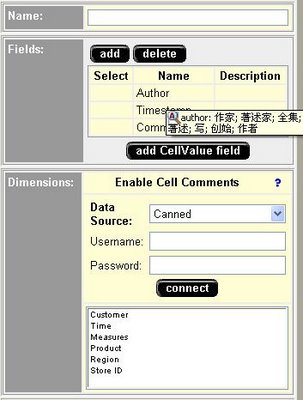
Click Save once you done.
Ok, you have done with the necessary configuration.
In your Blox programming, you can do the following:
1. Enabling Commenting for GridBlox
...
<blox:data><blox:comments collectionName="YourCommentCollectionName" dataSourceName="TheDataSourceUsedForCollection" /></blox:data>
...
...
<blox:grid commentsEnabled="true" />
...
Then when you right click on your grid cell, an option called "Comments" will appear.
2. Use com.alphablox.blox.CommentsBlox and related com.alphablox.blox.comments.*
This allows you to implement Commenting feature for your relational reports or any other general usage. Requires programming though.
CommentsBlox allows you to provide cell commenting (also known as cell annotations) functionality to your application. In addition, you can use CommentsBlox for general commenting that are not tied to any other Blox. For example, you can allow users to add comments to a site, an application, a report, or a Web page.
Comments are stored in a JDBC accessible relational database. Supported databases include IBM(R) DB2(R) UDB, Sybase, Microsoft(R) SQL Server, and Oracle. This data source needs to be defined to DB2 Alphablox. DB2 Alphablox provides a Comments Management page under the Server link in the DB2 Alphablox Administration tab that lets you specify the relational data source to use for storing comments. From that page, you can create "collections" (data tables) to store comments. For cell-level comments, you will need to specify the multidimensional data source used in your GridBlox, the cube to use (for Microsoft Analysis Services), and the dimensions to include. For general comments, you only need to specify the name.
Here is what you need to do to get a feel of the built-in CommentsBlox in Alphablox.
First, go to Alphablox Administration Site, by default should be accessible from http://yourserver:9080/AlphabloxAdmin/
From the Administration main tab, you should be in General paage by default. There is a Runtime Management section, amongst others. Click on the Comments link under this section. A pop-up window should appear that refer to http://yourserver:9080/AlphabloxAdmin/comments/commentsAdmin.jsp.
Here you gotta define the comments collection (sort of like a repository to store a particular set of comments) and maybe customize the set of fields used for commenting.
Choose a data source that you already defined elsewhere, enter the security credential and click Connect button. All existing collections should appear in the list provided.
Click Create button, since you want to create a new collection. You need to fill in the details for the form provided, particularly you need to specify the dimension to enable the comments and the fields required for the comment entry.
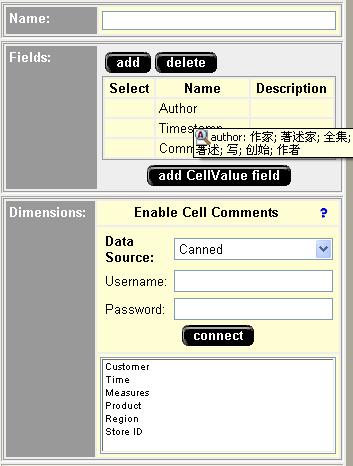
Click Save once you done.
Ok, you have done with the necessary configuration.
In your Blox programming, you can do the following:
1. Enabling Commenting for GridBlox
...
<blox:data><blox:comments collectionName="YourCommentCollectionName" dataSourceName="TheDataSourceUsedForCollection" /></blox:data>
...
...
<blox:grid commentsEnabled="true" />
...
Then when you right click on your grid cell, an option called "Comments" will appear.
2. Use com.alphablox.blox.CommentsBlox and related com.alphablox.blox.comments.*
This allows you to implement Commenting feature for your relational reports or any other general usage. Requires programming though.
Should Divide Alphablox Relational Reporting By Zero !
If you are doing relational reporting using IBM DB2 Alphablox, you might face this situation.
In Alphablox, you can define calculated column using bloxreport:calculate custom action. However, the functionality supported by the expression is pretty limited, even to say "Quite Useless". According to the offcial little documentation, only arithmetic +, -, *, /, sum(), (), runningTotal, rank, runningCount, and percentOfTotal are supported. Missing from it is the ability to conditionally process the value in the calculated column.
Now, I created a calculated column that contains the expression "NEWCOL = COL1 / COL2". A typical problematic scenario is when the value of COL2 is zero, and hence the expression is evaluated to "Divided by Zero". Alphablox Relational display a demonic "?" for such a result. No customer want to see their reports flooded with alot of "?".
After hours of finding and hacking around the classes and constants provided by Alphablox Relational. A feasible workaround is to replace the "Divided by Zero" value using a combination of Alphablox Relational tags and Javascript.
Here is one example of such solution:
<script>
function fix(s) {
if (s=="?") document.write ("0");
else { document.write (s) }
}
</script>
<bloxreport:report id="sample1" errors="true" bloxname="sample5">
<bloxreport:canneddata></bloxreport:canneddata>
<bloxreport:calculate expression="col1 = 0.0"></bloxreport:calculate>
<bloxreport:calculate expression="col2 = 0.0"></bloxreport:calculate>
<bloxreport:calculate expression="col3=col1/col2"></bloxreport:calculate>
<bloxreport:text>
<bloxreport:data columnname="col3" text="<script>fix('<value />');</script>" /> </bloxreport:text>
</bloxreport:report>
The idea is to invoke custom logic to manipulate the cell value in the client browser, instead of the server. This is solely because I can't find any documented API that allows me to do so in the server side.
Though it works, more testings are required for the above solution, especially when exporting the relational report to pdf and excel. These report delivery environments might not understood Javascript, hence wouldn't display any value for the formatted cells.
Let cross our finger and hope for similar enhancement to the Alphablox Relational report formatting capability in its' future releases. I have to mention here that even JasperReport is superior than Alphablox Relational in this area.
In Alphablox, you can define calculated column using bloxreport:calculate custom action. However, the functionality supported by the expression is pretty limited, even to say "Quite Useless". According to the offcial little documentation, only arithmetic +, -, *, /, sum(), (), runningTotal, rank, runningCount, and percentOfTotal are supported. Missing from it is the ability to conditionally process the value in the calculated column.
Now, I created a calculated column that contains the expression "NEWCOL = COL1 / COL2". A typical problematic scenario is when the value of COL2 is zero, and hence the expression is evaluated to "Divided by Zero". Alphablox Relational display a demonic "?" for such a result. No customer want to see their reports flooded with alot of "?".
After hours of finding and hacking around the classes and constants provided by Alphablox Relational. A feasible workaround is to replace the "Divided by Zero" value using a combination of Alphablox Relational tags and Javascript.
Here is one example of such solution:
<script>
function fix(s) {
if (s=="?") document.write ("0");
else { document.write (s) }
}
</script>
<bloxreport:report id="sample1" errors="true" bloxname="sample5">
<bloxreport:canneddata></bloxreport:canneddata>
<bloxreport:calculate expression="col1 = 0.0"></bloxreport:calculate>
<bloxreport:calculate expression="col2 = 0.0"></bloxreport:calculate>
<bloxreport:calculate expression="col3=col1/col2"></bloxreport:calculate>
<bloxreport:text>
<bloxreport:data columnname="col3" text="<script>fix('<value />');</script>" /> </bloxreport:text>
</bloxreport:report>
The idea is to invoke custom logic to manipulate the cell value in the client browser, instead of the server. This is solely because I can't find any documented API that allows me to do so in the server side.
Though it works, more testings are required for the above solution, especially when exporting the relational report to pdf and excel. These report delivery environments might not understood Javascript, hence wouldn't display any value for the formatted cells.
Let cross our finger and hope for similar enhancement to the Alphablox Relational report formatting capability in its' future releases. I have to mention here that even JasperReport is superior than Alphablox Relational in this area.
Lack of IBM Alphablox Community
As of time of this writing, I did perform some searches in Google about IBM Alphablox. Almost 70-80% of the returned search results are marketing articles lead me to a conclusion that if you are not adventurous enough or don't want to spend your precious department funds calling up Alphablox customer service, you might want to think twice before deploying it as your corporate analytics solution at this moment. The size of Alphablox community still below the level needed for a mature enterprise level technology. This might causes frustration if Alphablox solution developer expects development problems to be solved by searching for solutions in the WWW. Hey fellow developer, time to use your brain. :p
Subscribe to:
Posts (Atom)

 Posts
Posts

