Showing posts with label Programming Tips. Show all posts

Friday, August 22, 2008

Connecting DB2 LUW to DB2 OS/390, Simple right?


Assuming that every necessary configurations are done at the zO/S, i.e. communication connectivity, authorizations, etc. It is blindly simple to set up DB2 LUW to talk to DB2 OS/390.

You just need to do the following in DB2 Command Window (Let say in Windows).


db2 catalog tcpip node NODE1 REMOTE SERVER OSTYPE OS390

db2 catalog dcs database AS

db2 catalog database AUTHENTICATION DCS


Ok, and if previously the utility packages are not bind yet, you might hit errors when try to run even simple commands in DB2 OS/390. To fix this, You will need to change directory to your \bnd now, and enter the following commands after you are connected to the host:


db2 bind @db2ubind.lst blocking all grant public
db2 bind @db2cli.lst blocking all grant public
db2 bind @ddcsmvs.lst blocking all grant public


Again, I will ask "Simple right?" ;-)


Top Blogs

Handle Slowly Changing Dimension in DB2

Excerpt from WWW about Slowly Changing Dimension:


The "Slowly Changing Dimension" problem is a common one particular to data warehousing. In a nutshell, this applies to cases where the attribute for a record varies over time. We give an example below:

Christina is a customer with ABC Inc. She first lived in Chicago, Illinois. So, the original entry in the customer lookup table has the following record:

Customer Key Name State
1001 Christina Illinois


At a later date, she moved to Los Angeles, California on January, 2003. How should ABC Inc. now modify its customer table to reflect this change? This is the "Slowly Changing Dimension" problem.

There are in general three ways to solve this type of problem, and they are categorized as follows:

Type 1: The new record replaces the original record. No trace of the old record exists.

Type 2: A new record is added into the customer dimension table. Therefore, the customer is treated essentially as two people.

Type 3: The original record is modified to reflect the change.


Well, you might be naive (talented?) enough to write your own framework to manage the slowly changing dimensions in your environment, however it is good to know that there is a handy tool at your disposal to minimize the plumbing works for those data management scenarios.

As of IBM DB2 version 8.1 FixPack 2 or later, MERGE statement is introduced.

The example below illustrates how Merge can take data from a staging table and use it to update or create dimension members accordingly.


MERGE INTO
DWH.DIM_COMPANY AS TARGET
USING
(SELECT ID, NAME, PHONE FROM DWHSTAG.COMPANY) AS SOURCE
ON SOURCE.ID = TARGET.ID
WHEN MATCHED THEN
UPDATE SET (NAME,PHONE)=(SOURCE.NAME,SOURCE.PHONE)
WHEN NOT MATCHED THEN
INSERT (ID, NAME, PHONE) VALUES (SOURCE.ID, SOURCE.NAME, SOURCE.PHONE)
ELSE IGNORE;


Do you think life is better now?

Complete Syntax on DB2 Merge Statement

DB2 Changing Statement Terminator Symbol

When you pass in -t command option to DB2 CLP, the delimiter ; (Semi colon) is turn on for enabling you to enter multiple statement lines before submitting it. This is typically acceptable behavour when you need to submit a single statement that encompassing multiple lines in the console.

What if you need to submit a large and complex stored procedure creation script to CLP? You can save the codes in a physical file then use db2 -t -f myProc.sql.

Then you hit errors that doesn't make sense at all.

Most probably the query parser is confused with the statement terminator and your substatement terminator. Substatements, such as those that you embedded in your stored procedure are forced to use ; as their termination character. In this case, when the parser encounter the first embedded semicolon, it would think that the statement is ready for parsing. Ta da. it strew up.

So, a better command would be "db2 -td# -f myProc.sql" assuming you are using # symbol as your statement terminator.

Yet, you might face another issue of encountering multiple different statement terminator in the same CLP session.

So you decide to

db2 -td#
select * from syscat.tables#
quit#

db2 -td$
select * from syscat.columns$
quit$

This example is trivial, but you get my point.

So, is there a better solution? O yeah, you can use one of the DB2 Control Option in the form of:

--#SET TERMINATOR

For example:

db2 -t
SELECT * FROM SYSCAT.TABLES FETCH FIRST 1 ROW ONLY;
--#SET TERMINATOR #
SELECT * FROM SYSCAT.COLUMNS FETCH FIRST 1 ROW ONLY#
--#SET TERMINATOR $
VALUES (1)$

Similar approach can be adopted in Java DB2 programming by submitting it as part of the query you sent to DB2.

DB2 Restore DB Command

Personally, I prefer to use Restore DB DB2 Command, instead of that Restore Database Wizard in Control Center. Don't know why, maybe I easily get confused by buttons and drop downs. ;-)

Here I will run down a simulation of backing up and restoring the database under different name in separate DB2 instance resides within same physical machine. Similar scenario might be to replicate databases for development, testing and production.

First, Fire up the Command Window (db2cmd)

Create the Development instance:

db2icrt DEV


Start the DEV instance


SET DB2INSTANCE=DEV
db2start


Create the sample database


CREATE DB DEVDB


Check out the list of tablespaces in the database, this is important when later you need to redirect the creation of tablespace containers.


db2 connect to DEVDB
db2 list tablespaces


Backup the sample DEVDB database. This will create a folder DEVDB.0 under C:


db2 BACKUP DB DEVDB TO C:


Create the Production instance:

db2icrt PROD


Start the PROD instance


SET DB2INSTANCE=PROD
db2start


Restore the backup DEVDB under C: to PRODDB in PROD instance.


db2 restore db DEVDB FROM C: INTO PRODDB redirect
db2 set tablespace containers for 0 using (path 'C:\container\tspace00c1')
db2 set tablespace containers for 1 using (path 'C:\container\tspace01c1')
db2 set tablespace containers for 2 using (path 'C:\container\tspace02c1')
db2 restore db DEVDB continue


Try to connect to the new PRODDB restored from DEVDB


db2 connect to PRODDB


The trick here is to specify a separate set of container paths for Restore DB command. This will depends on number of tablespaces used by your DB. Default is only 3 tablespaces: SYS, TEMP and USER.


To clean up the simulation, do the following:


set DB2INSTANCE=DEV
db2stop force
set DB2INSTANCE=PROD
db2stop force

db2idrop DEV
db2idrop PROD

Manually remove C:\DEV, C:\PROD, C:\DEVDB.0 and C:\container

Enable Commenting (Comments)

An excerpt from Alphablox 8.4 documentation:


CommentsBlox allows you to provide cell commenting (also known as cell annotations) functionality to your application. In addition, you can use CommentsBlox for general commenting that are not tied to any other Blox. For example, you can allow users to add comments to a site, an application, a report, or a Web page.

Comments are stored in a JDBC accessible relational database. Supported databases include IBM(R) DB2(R) UDB, Sybase, Microsoft(R) SQL Server, and Oracle. This data source needs to be defined to DB2 Alphablox. DB2 Alphablox provides a Comments Management page under the Server link in the DB2 Alphablox Administration tab that lets you specify the relational data source to use for storing comments. From that page, you can create "collections" (data tables) to store comments. For cell-level comments, you will need to specify the multidimensional data source used in your GridBlox, the cube to use (for Microsoft Analysis Services), and the dimensions to include. For general comments, you only need to specify the name.


Here is what you need to do to get a feel of the built-in CommentsBlox in Alphablox.

First, go to Alphablox Administration Site, by default should be accessible from http://yourserver:9080/AlphabloxAdmin/

From the Administration main tab, you should be in General paage by default. There is a Runtime Management section, amongst others. Click on the Comments link under this section. A pop-up window should appear that refer to http://yourserver:9080/AlphabloxAdmin/comments/commentsAdmin.jsp.

Here you gotta define the comments collection (sort of like a repository to store a particular set of comments) and maybe customize the set of fields used for commenting.

Choose a data source that you already defined elsewhere, enter the security credential and click Connect button. All existing collections should appear in the list provided.


Click Create button, since you want to create a new collection. You need to fill in the details for the form provided, particularly you need to specify the dimension to enable the comments and the fields required for the comment entry.
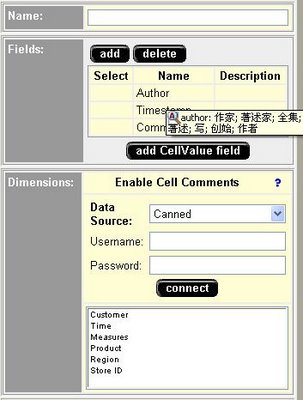


Click Save once you done.

Ok, you have done with the necessary configuration.

In your Blox programming, you can do the following:

1. Enabling Commenting for GridBlox
...
<blox:data><blox:comments collectionName="YourCommentCollectionName" dataSourceName="TheDataSourceUsedForCollection" /></blox:data>
...

...
<blox:grid commentsEnabled="true" />
...

Then when you right click on your grid cell, an option called "Comments" will appear.


2. Use com.alphablox.blox.CommentsBlox and related com.alphablox.blox.comments.*

This allows you to implement Commenting feature for your relational reports or any other general usage. Requires programming though.

DB2 How to Empty a Table

In data warehouse environment, usually there is a need to clear out the contents of staging tables to prepare for a fresh set of extracted source data. You might also want to housekeep some historical aggregation according to some predefined schedules, which involves copying data from a table to another and subsequently removed all data from the copied table. These are just some of the examples that boiled down to the need of efficiently "truncate" a table.

Microsoft SQL Server and Oracle DBA are definitely enjoying the luxury of built-in table truncation functionality, through command like "TRUNCATE TABLE YourTableName".
Ok fine, but does IBM DB2 UDB, the so-called most scalable and performing RDBMS provide such option?

Before that, let me evaluate some of the options of removing rows from a table.

Option A:

DELETE FROM YourTable

Well, you can delete all rows using this statement. However when involving lot of records, transaction logging causes significant performanc degradation. Still, this option is acceptable if your application requires recovery of deleted rows.


Option B:


(Assume this is within the same transaction)
ALTER TABLE YourTable ACTIVATE NOT LOGGED INITIALLY;
DELETE FROM YourTable;


You managed to escape the bad luck of doing a lot of transaction logging. But wait a minute, constraint checking are still in force (Check yourself by doing explaining a DELETE FROM statement).


Option C:


(Assume this is within the same transaction)
SET INTEGRITY FOR YourTable OFF;
ALTER TABLE YourTable ACTIVATE NOT LOGGED INITIALLY;
DELETE FROM YourTable;


Again, you managed to skip the logging and check constraint and referential constraint checking, datalink integrity checking, and generation of values for generated columns. Primary/Unique Key constraints still enforced.

Option D:


LOAD FROM /dev/null of del REPLACE INTO YourTable


This is by far the most common workaround that I have seen for table truncation. It basically uses the LOAD utility on /dev/null for simulating the loading (replace) of no-data into the designated table. The same concept works for Windows environment.

You can also use similar IMPORT FROM /dev/null of DEL REPLACE INTO YourTable. There are some differences between IMPORT/LOAD.

Option E:

With a little bit of guts, you can drop and recreate the tables. This can be tedious if you got to recreate every constraints/views/etc that dependent on the "new" table.

Option F:


ALTER TABLE YourTable ACTIVATE NOT LOGGED INITIALLY WITH EMPTY TABLE


This is by far my favorite way of doing "TRUNCATE Table" in DB2.

Which ring suits you? You decide.

Be Smart. Get A Row Number !

Imagine there is a table with no primary key or unique constraint and volumes of duplicated rows keep coming in. The only piece of information that differentiates these rows is a timstamp column that stores the date and time where record is inserted.


ID (VARCHAR)NAME (VARCHAR)AMOUNT (INT)LAST_UPDATED (TIMESTAMP)
1Eddy80000.002006-03-14-00.10.31.999999
1Eddy90000.002006-03-14-00.09.31.999999
1Eddy90000.002006-03-14-00.11.31.999999
2Lee Sin Ti100.002006-03-14-00.10.31.999999
2Lee Sin Ti200.002006-03-14-00.09.31.999999

Table1


Based on this, your DB2 query is to remove all the outdated records while maintaining only the latest entries.


An idiotic first attempt:

DELETE FROM TABLE1
WHERE
ID || NAME || CAST (AMOUNT AS VARCHAR(32)) || CAST(LAST_UPDATED AS VARCHAR(64))
NOT IN
(
SELECT (ID || NAME || CAST(AMOUNT AS VARCHAR(32)) || CAST(MAX(LAST_UPDATED) AS VARCHAR(64)) ) AS KEY FROM TABLE1 GROUP BY ID, NAME
);

This attempt is definitely a NO-NO. Not only the string concatenations takes a huge amount of processing cycles, it is also UGLY in my point of view. Using a generated random data of 100k records, it takes an unacceptable amount of time to complete the delete query.

Then, my second attempt got to deal with DB2 support of row_number() function, which I greatly appreciated from IBM.


Second attempt:

DELETE FROM
(
SELECT ROW_NUMBER() OVER (PARTITION BY ID, NAME ORDER BY LAST_UPDATED DESC)
FROM TABLE1
) AS X (ROWNUM) WHERE ROWNUM > 1;

WOW, an optimized yet elegant query to achieve my goal. With the same random data set, it only took less than 1 minute to complete the query.