Showing posts with label Process. Show all posts

Friday, August 22, 2008

IBM DB2 HADR Example

Here is an HADR configuration example that I did when preparing for my DBA certification. It has being awhile when I performed these steps, so bear with me if there are any mistakes or errors in the description.


DB2(R) high availability disaster recovery (HADR) is a data replication feature that provides a high availability solution for both partial and complete site failures. HADR protects against data loss by replicating data changes from a source database, called the primary, to a target database, called the standby.


This practice assumes two DB2 instances, named DB2INST1 and DB2INST2 resides in the same physical machine.

For configuring HADR, you will need few pieces of information.

Update DB2 Registry Profile
DB2 Communication Protocol (DB2COMM)

Update Each Instance DBM Configuration
DB2 TCPIP Listening Port (SVCENAME)

Update Primary DB Archical Logging Configuration
Log Pages During Index Rebuild (LOGINDEXBUILD)
Index Creation Time (INDEXREC)
Retain Log (LOGRETAIN)

Update Each DB HADR Configuration
Local IP Address (HADR_LOCAL_HOST)
Local Service Name/Port (HADR_LOCAL_SVC)
Remote IP Address (HADR_REMOTE_HOST)
Remote Service Name/Port (HADR_REMOTE_SVC)
Remote DB2 Instance Name (HADR_REMOTE_INST)
Synchronization Mode (HADR_SYNCMODE)


For the intent of all purposes, I installed a fresh copy of DB2 ESE version 9 and chooose NOT to create the default DB2 instance. Windows environment is assumed.


Step 1: Create 2 DB2 Instances

Open up an instance of DB2 Command Window by typing "db2cmd" in Run dialog.

Create Instance 1 by typing "db2icrt DB2INST1"

Create Instance 1 by typing "db2icrt DB2INST2"


Step 2: Configure Instance 1

Type the following commands:

SET DB2INSTANCE=DB2INST1
db2set DB2COMM=tcpip
db2 update dbm cfg using SVCENAME 41001
db2start


Note: The TCPIP service port for this instance is 41001

Step 3: Configure Instance 2

Type the following commands:

SET DB2INSTANCE=DB2INST2
db2set DB2COMM=tcpip
db2 update dbm cfg using SVCENAME 42001
db2start

Note: The TCPIP service port for this instance is 42001


Step 4: Create the Primary DB in Instance 1

Type the following commands:

SET DB2INSTANCE=DB2INST1
db2 create db BANKFRS
db2 update db cfg for BANKFRS using LOGINDEXBUILD on
db2 update db cfg for BANKFRS using INDEXREC RESTART
db2 update db cfg for BANKFRS using LOGRETAIN on

Note: This step will turn the DB into archival logging mode


Step 5: Create a backup of Primary DB

Type the following commands:

db2 BACKUP DB BANKFRS TO C:\TEMP

Note: This step will backup the BANKFRS db into C:\TEMP


Step 6: Restore the backup BANKFRS as Standby database

Type the following commands:

SET DB2INSTANCE=DB2INST2
db2 RESTORE DB BANKFRS FROM C:\TEMP

Note: This step will restore the database as BANKFRS in the second DB2 instance and place it into roll forward pending state.

Note: If you roll forward the BANKFRS now, you will not be able to initialize it as the standby database.


Step 7: Configure the HADR settings for the Primary DB in DB2INST1

Type the following commands:

SET DB2INSTANCE=DB2INST1
db2 update alternate server for database BANKFRS using hostname localhost port 42001
db2 update db cfg for BANKFRS using hadr_local_host localhost
db2 update db cfg for BANKFRS using hadr_local_svc 41005
db2 update db cfg for BANKFRS using hadr_remote_host localhost
db2 update db cfg for BANKFRS using hadr_remote_svc 42005
db2 update db cfg for BANKFRS using hadr_remote_inst DB2INST2
db2 update db cfg for BANKFRS using hadr_syncmode SYNC
db2 update db cfg for BANKFRS using hadr_timeout 120

Note: Primary BANKFRS HADR service port will be 41005.
Note: Standby BANKFRS HADR service port will be 42005.
Warning: You cannot use the Instance TCPIP port (SVCENAME) or next port number (SVCENAME+1) as the HADR service port. This is by design.


Step 7: Configure the HADR settings for the Primary DB in DB2INST1

Type the following commands:

SET DB2INSTANCE=DB2INST1
db2 update alternate server for database BANKFRS using hostname localhost port 41001
db2 update db cfg for BANKFRS using hadr_local_host localhost
db2 update db cfg for BANKFRS using hadr_local_svc 42005
db2 update db cfg for BANKFRS using hadr_remote_host localhost
db2 update db cfg for BANKFRS using hadr_remote_svc 41005
db2 update db cfg for BANKFRS using hadr_remote_inst DB2INST1
db2 update db cfg for BANKFRS using hadr_syncmode SYNC
db2 update db cfg for vusing hadr_timeout 120

Note: Primary BANKFRS HADR service port will be 41005.
Note: Standby BANKFRS HADR service port will be 42005.
Warning: You cannot use the Instance TCPIP port (SVCENAME) or next port number (SVCENAME+1) as the HADR service port. This is by design.


Now, you are ready to test the configuration.


Step 8: Start HADR on Standby DB IN DB2INST2

SET DB2INSTANCE=DB2INST2
db2 START HADR ON DB BANKFRS AS STANDBY


Step 9: Start HADR on Primary DB IN DB2INST1

SET DB2INSTANCE=DB2INST1
db2 START HADR ON DB BANKFRS AS PRIMARY


Step 10: Take over the Primary Role to Standby Instance

SET DB2INSTANCE=DB2INST2
db2 TAKEOVER HADR ON DB BANKFRS


Step 11: Take back the Primary Role from Standby Instance

SET DB2INSTANCE=DB2INST1
db2 TAKEOVER HADR ON DB BANKFRS

Step 12: Stop the HADR service on Primary DB

SET DB2INSTANCE=DB2INST1
db2 STOP HADR ON DB BANKFRS


Step 13: Stop the HADR service on Standby DB

SET DB2INSTANCE=DB2INST2
db2 deactivate db BANKFRS
db2 STOP HADR ON DN BANKFRS


General Notes:

You can invoke the HADR wizard from the DB2 Control Center by right clicking on the specific database and select "High Availability and Disaster Recovery" -> Setup

You can monitor the HADR status on the database by using the database snapshot monitor. "db2 get snapshot for database on BANKFRS"

IBM Data Warehouse Edition DWH Password Maze

Stringent user account security policy in the network domain can cause damaging maintenance headache in deployed IBM DWH multiservers environment. User account information are all around the places, in your DB2 services, WAS server, Alphablox and so on. The day when the user passwords expired or required account disabled, it will be the day DWE solutions face total outrage. Well, may be I'm just exaggerating.

Where do you update the user credentials in DWE environment when such a need arise?

Briefly speaking, at least the following locations:

1. DB2 Windows services, assuming Windows environment

Log On As for each DB services need to be updated.


2. Websphere Global Security Setting, assuming using LocalOS repository

This can be tricky. The easiest is to update the password before you shut down the WAS server. If the server already shut down and you didn't manage to update the password, then you wouldn't be able to start the server again because of authentication error. If this is the case, you got to manually disable the WAS global security by changing the "enabled" attribute of security:Security xml element to false in security.xml file located in /config/cells/Cell. Then start the server, update the password in LocalOS setting and turn on Global Security again by checking on the option in WAS Admin Console.

3. Data Sources defined in DWE Admin Console

Data Sources used by DWH application processes, which are not attached to WAS data source, must be updated.

Before you can perform this, you need to update the J2C user password in WAS for Admin Console to be able to connect to its repository. (Item 6)

4. Data Sources defined in Alphablox Admin Console

Usually this will be data sources for Alphablox cubes to retrieve IBM Cube Views meta data.

5. WAS account used by Alphablox for management

Alphablox uses a WAS user credential for connecting to WAS and managing Alphablx applications in WAS. This piece of information is located in Alphablox repository, /servers/AlphabloxAnalytics/server.properties.

Replace the line ws.admin.password.protected with ws.admin.password=<your_password_in_plaintext>

The issue here is that the new password will be in clear text. I read across some materials that say the password is encoded again the next time the server restarted. However, I don't see that happens in my environment.

6. WAS J2C Authentication entries

7. WAS JNDI Data Sources, assuming not using J2C authentication

8. Optionally, WAS Windows Services


Hope this is helpful to you.

Alphablox Cube Security

I really headache when customer want to impose security constraints on Alphablox solution. Here is a simple security problem that I need to solve.

A local bank in Malaysia has 14 main branches throughout the country where each state got one main branch. There is at least 2 groups of users with different level of data access. One group is country wide users who can view the data for all the states. Another group being state manager which can only sees their own cake.

My first attempt is defining a user property called BelongingState and assign it state code that user belongs to, or "ALL" if they are country wide users. Then I would use Java codes to dynamically construct the MDX for the DataBlox. Thought this will solve my problem, but some user actions would causes rewrite of the MDX automatically (Seems like the default behavior). For example, Show Siblings action will display all members on the same level. This totally defeats my aim of controlling view by Malaysia state. Another one is the Drill Up action. I also found Member Filter dialog and Drill Down (There are 5 types of Drill Down available) action can causes exploitation on data.

Due to lack of time to spend on digging deep into Alphablox object model, I revert to a quick resolution: use removeAction attribute to disable Drill Up, Member Filter and Show Siblings for state level users. At the same time, I wrote a filter on Drilldown event to check the drill down option and prevent the drill down to inappropriate data area. This cut off a lot of interactivity from user, but for the sake of security, some trade offs gotta be made.

Giving some faith to developers who wrote Alphablox framework, I believe there should be some methods to disable MDX rewrite due to user activity, thus preventing the underlying data set from changing. One thing to note if that if you are using MSAS or Essbase as cube source, then you can rely on the native security control features of these cube engines for security. Particularly you can use MemberSecurity tag for this purpose. For Cube View based cubes, may be it could be possible to control the view at database level.

Back to square one, my point of bringing this topic up is that it is important to plan for security requirements to match the out of the box security features provided by Alphablox. For my simple security scenario, I personally think that it is more usable to create 14 identical cubes, each for different state. By controlling which cube that users use in their report, you can be sure that the data view doesn't violate the security expectation, yet retaining powerful interactivity actions such as Member Filter and Drill Up. Things can get pretty ugly and complicated when the security requirements are not just on one dimension. In this case, creating separate cube for different data view might not be practical.

Lastly, localization is another aspect of global business intelligence application that can be as tricky as security factor to implement in Alphablox solution. I really need to appraise Microsoft Analysis Services (MSAS) for incorporating security and localization so well in their cubes. Maybe this is what differentiates market leader and players.

IBM DB2 Exam 000-700

I did it in the reverse way. I took the exam 000-705, yet I still haven't take 000-700. It's time now to bridge the gap and to obtain the official title of BI Designer.

Following are the steps I took for the preparation:


1. Read DB2 Family Fundamental Guide from IBM

6 chapters guide. Clear and concise to help you pass above 75%.

2. Read eLearning Crammer Course Material from colleague

Consists some sample questions and added notes for task 1. If you read this, 80% and above shouldn't difficult.

6 chapters guide. Clear and concise to help you pass above 75%.

3. Read a 400 pages book

DB2® Universal Database™ V8.1 Certification Exam 700 Study Guide
By Roger E. Sanders

Must read if you plan to get 85% and above.

4. Use DB2 whenever possible

SQL section constitutes 31% of exam. Practice makes perfect. I wouldn't need to do this step since I'm already quite good in it. :p

Must do if 90% and above is your target

Note: No. No advanced SQL covered in the exam. No recursive SQL you bet!


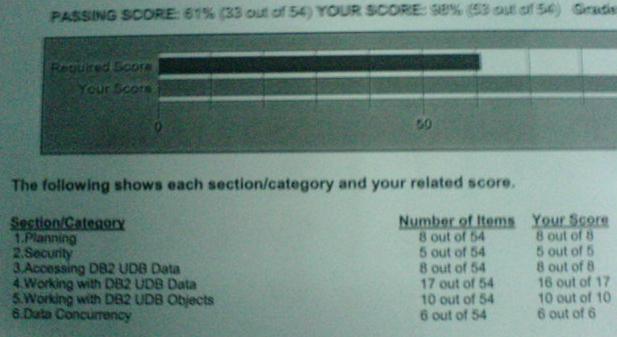
My result sheet


Some of the questions are pretty tricky. I shall not put the real questions here, but just to give you some clues, here is a similar one:

(Not REAL questions)

1.) If you gotta build DB2 application on XXX OS and it need to access YYYY OS DB2 Server when deployed, which of the following DB2 product is the minimal you need?

a. DB2 UDB Personal Edition
b. DB2 UDB Personal Edition with DB2 Connect Enterprise Edition
c. DB2 Personal Developer Edition
d. DB2 Universal Developer Edition

Answer is C. Because you need to build DB2 application, you need the SDK toolkit and at least a DB2 UDB PE for testing, therefore C is the minimal. D can be the answer is the question is not on MINIMAL because DB2 UDE includes every DB2 PDE components. A and B is definitely not the answer since it doesn't include SDK in the package.

and another typical kind of question.

2.) What should you catalog for a client to access a DB2 host database?

Answer: You need to catalog the remote server in the NODE directory, the remote database in the System DB directory AND remote database in the DCS directory since you need to use DB2 Connect to access host database. You need to understand the parameter use in these CATALOG statements.


Good luck for you folks that taking this exam.

IBM DB2 Exam 000-705

To earn the title as IBM Certified Business Intelligence Designer, I got to get myself pass in two exams. 000-700 and 000-705. I already passed the 000-705 BI exam during IBM Malaysia sponsored workshop (It's free for IBM business partner).

Here is the summary of the 000-705 exam preparation and experience.


1. 3 days of IBM DWE V9 bootcamp

Hmmm, not that relevant to the 705 exam, more like IBM try to equip its' business partners presales skills on the new DB2 DWE. It covers topics like the new Design Studio, Intelligent Miner, Cube making and etc.

2. 1 day of 705 exam workshop

It is like a last minute top-up of the knowledge pertaining to the 705 exam objectives. The instructor covers the test objectives one by one, and goes through some sample questions.

3. Self study

Got myself the copy of study guide from IBM web site for BI Designer exam version 7, most of the concepts and theories are still applicable.

Found a few excerpts from the book
"Business Intelligence for the Enterprise",
ISBN: 0-13-141303-1

This book is only 240 pages and it tells you general "stories" of Business Intelligence. Personally, I found it not that useful for the exam, but still something interesting to read about.


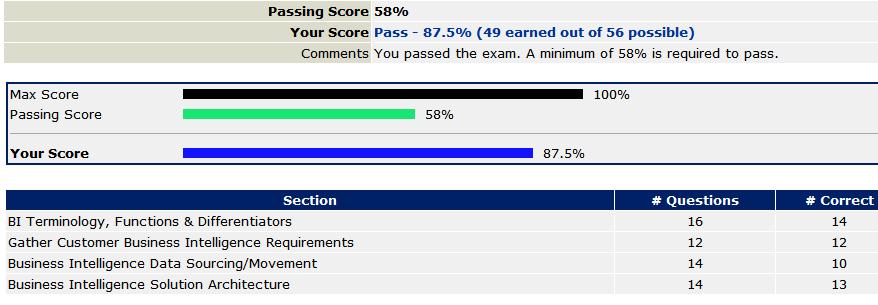
Scored a 87.5% or answered 49 questions correct out of total 56 questions.
Hit major bumper in the section "Business Intelligence Data Sourcing/Movement", which mostly the questions on replication and types of data warehouse processing (full, incremental, snapshot, etc).

705 is not a technical paper. If you have decent experience in data warehousing and business intelligence, then questions in the terminology, requirements and architecture are piece of cake.

Again, it is easy to pass, but hard to score and excel.