Showing posts with label Java. Show all posts

Wednesday, February 11, 2009

Weird IBM RPM Catastrophics Error


Our latest IBM RPM customer is opted for a relatively smaller investment in the solution, their system configuration of RPM involved the following components:

DB2 Express-C 9.5
Tomcat 5.5
JDK 5.0
Windows 2003
IBM RPM 7.1.1.2

Based on the instructions of the official guide of IBM RPM 7.1.1.2, there are some additional steps needed for the proper installation of the solution. You can refer to the guide for further information.

The installation took almost 1 day due to our unfamiliarity with such environment because we usually deal with IBM WAS and DB2 ESE. So we did it slowly to avoid unnecessary mistakes.

The installation was a successful one with no error in the logs.

However, a post installation testing procedure revealed some drastic and yet can be frigthening issues, some of them includes:

* When clicked on Investment Map in the Dashboard, it will respond with a EOleException Catastrophics error with some Windows hexadecimal code that translated to a very general error message.

* When try to save text key in the rich text control in the portlet, it will not be saved.

* More EOleException Catastrophic error in other features.

Very interesting indeed because none of the logs (Windows event, tomcat logs and DB2 logs) were unable to reveal any useful hints on the error.

We decided to open a case with IBM Support since the team will be busy doing other functional works.

The communication was established for almost 2 months with no apparent solution to the problem. We did the regular log compilation, scenario description, screen shots blah blah.... At the end, the support even suggested that the DB2 Express-C v9.5 is not supported by the RPM and thus unable to escalate it further. :-S

Since the project is almost near the completion and the risk of this error haunting us is getting more obvious and serious, the team decided to commit more efforts to fix it.

Here are the problem solving sequences we took:

Note: Our VM Test environment doesn't have the EOleException problem. Thus we believe it is environment specific, not a product bug.


1. Disable all irrelevant services in the OS and test
- Unchanged. Rule out the problem of software conflicting
- Enable back everything

2. Run the RPM Client outside the server machine, i.e. client workstation
- Unchanged. Confirmed it is server based problem. RPM Standalone and Plugins behaves the same.

3. Accidentally we had tried this scenario and found out something interesting.
We opened up the RPM Client and triggered the EOleException catastrophics error and then clicked Ok to continue. Then we recycled the Tomcat while the client was opened. The error will not triggered again and everything is fine, including the rich text control saving problem.
- This has revealed an important hint that the problem is caused by something shared between the client program and the Tomcat in the server.
- Since the client program is a Windows executable, possibly this got to do with some DLLs or something that the client program "loaded" before the Tomcat. I can't be sure since I don't have access to the source codes.

4. We checked the java.library.path from the Tomcat logs and found that there are another copy of xercesImpl.jar and xmlApi.jar in the path. To play safe, we removed these files and tested again. No luck.
- Rules out the problem of JAR class loading because logically the client program and Tomcat doesn't really use them together (I think).

5. A tip that we learnt from the Support is that we can stream out the logs generated by the client program using the "RPMStdIn.exe > logs.txt" and this log will contain information such as stored procedure called with parameters.
- By triggering the error, now the logs.txt contains the stored procedure that causes the error.

6. From 5 above, we copied the call information and executed it directly in DB2
- No errors returned from DB2. This confirmed the problem with how Tomcat or something inside Tomcat interpret or handle the SP call.

7. Confirm the JDBC Driver
- No problem as we directly used the drivers from the local DB2 Express-C.

8. Ruling out so many things and we start to suspect something more fundamental causes this, i.e. the Java execution environment. A check on the Tomcat JRE indicated the use of JRE 1.5.0.2. Cross referenced to Tomcat 5.5 and RPM 7.1.1.2 and none of the manual said anything about a particular level of J2SE 5.0 to be used.
- Since we running out of options, we decided to upgrade the JRE to 1.5.0.16 since that version was used in our VM too (LOL, we realized that too late I guess)
- Bingo, the error is no more.
- To reconfirm, we installed JRE1.5.0.2 in our VM and let the Tomcat used it and we managed to resimulate the problem, which is something that we were unable to perform since the reporting of the case to the Support.


All this havoc just because of insufficient information from the official about supported environments for RPM. Aiks.

P/S: IBM RPM guide never mentioned about the DB2 editions supported and this might be a grey area on the supportability of any RPM deployments.

Professionally, I strongly believe that CA Clarity did a great job on explicitly documented down the supported environments to the details on levels, fix packs, versions and so on. It can help to get rid of weird problem(s) like the one we encountered here.



Top Blogs

Friday, August 22, 2008

DB2 Changing Statement Terminator Symbol

When you pass in -t command option to DB2 CLP, the delimiter ; (Semi colon) is turn on for enabling you to enter multiple statement lines before submitting it. This is typically acceptable behavour when you need to submit a single statement that encompassing multiple lines in the console.

What if you need to submit a large and complex stored procedure creation script to CLP? You can save the codes in a physical file then use db2 -t -f myProc.sql.

Then you hit errors that doesn't make sense at all.

Most probably the query parser is confused with the statement terminator and your substatement terminator. Substatements, such as those that you embedded in your stored procedure are forced to use ; as their termination character. In this case, when the parser encounter the first embedded semicolon, it would think that the statement is ready for parsing. Ta da. it strew up.

So, a better command would be "db2 -td# -f myProc.sql" assuming you are using # symbol as your statement terminator.

Yet, you might face another issue of encountering multiple different statement terminator in the same CLP session.

So you decide to

db2 -td#
select * from syscat.tables#
quit#

db2 -td$
select * from syscat.columns$
quit$

This example is trivial, but you get my point.

So, is there a better solution? O yeah, you can use one of the DB2 Control Option in the form of:

--#SET TERMINATOR

For example:

db2 -t
SELECT * FROM SYSCAT.TABLES FETCH FIRST 1 ROW ONLY;
--#SET TERMINATOR #
SELECT * FROM SYSCAT.COLUMNS FETCH FIRST 1 ROW ONLY#
--#SET TERMINATOR $
VALUES (1)$

Similar approach can be adopted in Java DB2 programming by submitting it as part of the query you sent to DB2.

Alphablox Cube Security

I really headache when customer want to impose security constraints on Alphablox solution. Here is a simple security problem that I need to solve.

A local bank in Malaysia has 14 main branches throughout the country where each state got one main branch. There is at least 2 groups of users with different level of data access. One group is country wide users who can view the data for all the states. Another group being state manager which can only sees their own cake.

My first attempt is defining a user property called BelongingState and assign it state code that user belongs to, or "ALL" if they are country wide users. Then I would use Java codes to dynamically construct the MDX for the DataBlox. Thought this will solve my problem, but some user actions would causes rewrite of the MDX automatically (Seems like the default behavior). For example, Show Siblings action will display all members on the same level. This totally defeats my aim of controlling view by Malaysia state. Another one is the Drill Up action. I also found Member Filter dialog and Drill Down (There are 5 types of Drill Down available) action can causes exploitation on data.

Due to lack of time to spend on digging deep into Alphablox object model, I revert to a quick resolution: use removeAction attribute to disable Drill Up, Member Filter and Show Siblings for state level users. At the same time, I wrote a filter on Drilldown event to check the drill down option and prevent the drill down to inappropriate data area. This cut off a lot of interactivity from user, but for the sake of security, some trade offs gotta be made.

Giving some faith to developers who wrote Alphablox framework, I believe there should be some methods to disable MDX rewrite due to user activity, thus preventing the underlying data set from changing. One thing to note if that if you are using MSAS or Essbase as cube source, then you can rely on the native security control features of these cube engines for security. Particularly you can use MemberSecurity tag for this purpose. For Cube View based cubes, may be it could be possible to control the view at database level.

Back to square one, my point of bringing this topic up is that it is important to plan for security requirements to match the out of the box security features provided by Alphablox. For my simple security scenario, I personally think that it is more usable to create 14 identical cubes, each for different state. By controlling which cube that users use in their report, you can be sure that the data view doesn't violate the security expectation, yet retaining powerful interactivity actions such as Member Filter and Drill Up. Things can get pretty ugly and complicated when the security requirements are not just on one dimension. In this case, creating separate cube for different data view might not be practical.

Lastly, localization is another aspect of global business intelligence application that can be as tricky as security factor to implement in Alphablox solution. I really need to appraise Microsoft Analysis Services (MSAS) for incorporating security and localization so well in their cubes. Maybe this is what differentiates market leader and players.

Enable Commenting (Comments)

An excerpt from Alphablox 8.4 documentation:


CommentsBlox allows you to provide cell commenting (also known as cell annotations) functionality to your application. In addition, you can use CommentsBlox for general commenting that are not tied to any other Blox. For example, you can allow users to add comments to a site, an application, a report, or a Web page.

Comments are stored in a JDBC accessible relational database. Supported databases include IBM(R) DB2(R) UDB, Sybase, Microsoft(R) SQL Server, and Oracle. This data source needs to be defined to DB2 Alphablox. DB2 Alphablox provides a Comments Management page under the Server link in the DB2 Alphablox Administration tab that lets you specify the relational data source to use for storing comments. From that page, you can create "collections" (data tables) to store comments. For cell-level comments, you will need to specify the multidimensional data source used in your GridBlox, the cube to use (for Microsoft Analysis Services), and the dimensions to include. For general comments, you only need to specify the name.


Here is what you need to do to get a feel of the built-in CommentsBlox in Alphablox.

First, go to Alphablox Administration Site, by default should be accessible from http://yourserver:9080/AlphabloxAdmin/

From the Administration main tab, you should be in General paage by default. There is a Runtime Management section, amongst others. Click on the Comments link under this section. A pop-up window should appear that refer to http://yourserver:9080/AlphabloxAdmin/comments/commentsAdmin.jsp.

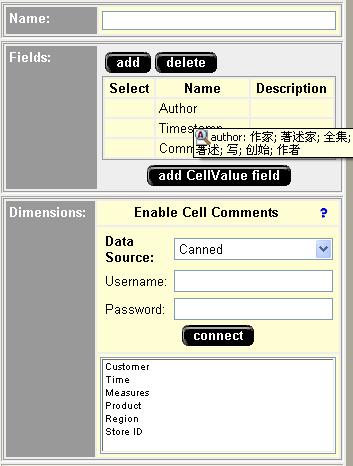
Here you gotta define the comments collection (sort of like a repository to store a particular set of comments) and maybe customize the set of fields used for commenting.

Choose a data source that you already defined elsewhere, enter the security credential and click Connect button. All existing collections should appear in the list provided.


Click Create button, since you want to create a new collection. You need to fill in the details for the form provided, particularly you need to specify the dimension to enable the comments and the fields required for the comment entry.


Click Save once you done.

Ok, you have done with the necessary configuration.

In your Blox programming, you can do the following:

1. Enabling Commenting for GridBlox
...
<blox:data><blox:comments collectionName="YourCommentCollectionName" dataSourceName="TheDataSourceUsedForCollection" /></blox:data>
...

...
<blox:grid commentsEnabled="true" />
...

Then when you right click on your grid cell, an option called "Comments" will appear.


2. Use com.alphablox.blox.CommentsBlox and related com.alphablox.blox.comments.*

This allows you to implement Commenting feature for your relational reports or any other general usage. Requires programming though.